I made a google spreadsheet which pulls data from two other workbooks using “importRange” and QUERY function. You can use either one if you just want to pull a few columns from another spreadsheet. QUERY provides more flexibility by allowing you to use a SQL statement. Here is an example of a query which pulls 2 columns from another workbook and filters out the blank rows in column 41:
=QUERY(importRange("yourSpreadsheetKeyHere", "Donations!A3:BB200000"), "select Col41, Col2 WHERE Col41!='' ", 1)
One of the biggest pains during the entire process was google spreadsheet’s vlookup. I learned the vlookup function only searches for a value in the first column in the Array. It’s also helpful if you format the results of your vlookup as “Plain Text” under the numbers format drop-down. Of course, something formatted as a number won’t match something formatted as plain text.
You could use this technique if you have a list of customer id’s with names, and a separate spreadsheet with more customer information. With this, you could combine that information.
It says not to use == to check for “none-ness”. It’s better to use:
ifvariableisnone:<yourcode>
Why? “And the reason for choosing egg is None over egg == None: The latter can be overloaded, and is likely to break when comparing valid object with None (depends on how it’s implemented, but you don’t expect everyone to take comparisons with None into account, do you?), while is always works the same.”
buttonoptimizer.com is a CSS button generator. You style a button in the browser and it gives you the CSS to paste into a stylesheet. Handy when I want a decent-looking button without pulling in a whole framework for one element.
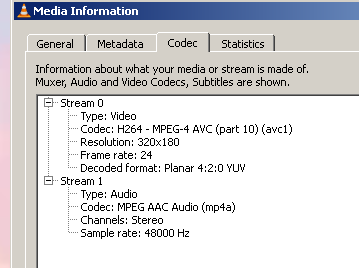
I converted a wmv video to a few different formats (mp4 and flv) and still couldn’t get the audio to play in Prezi. However, videos with the following codec settings will work:
Solution: Open your video with Handbrake and convert it to H264 with AAC as the selected audio codec and it will play just fine.
“I’m going to recommend PureFTPD because it’s been the simplest and easiest to use in my opinion. You’ll need to install it first: sudo apt-get install pure-ftpd once it’s installed it’ll start itself up.”
I saw this javascript library in the code for the Mozilla Support page (really well done). It looks like it adds HTML5 functionality to older versions of IE. Looks like it should be really useful in the future.