ESP32 Plant Sensor
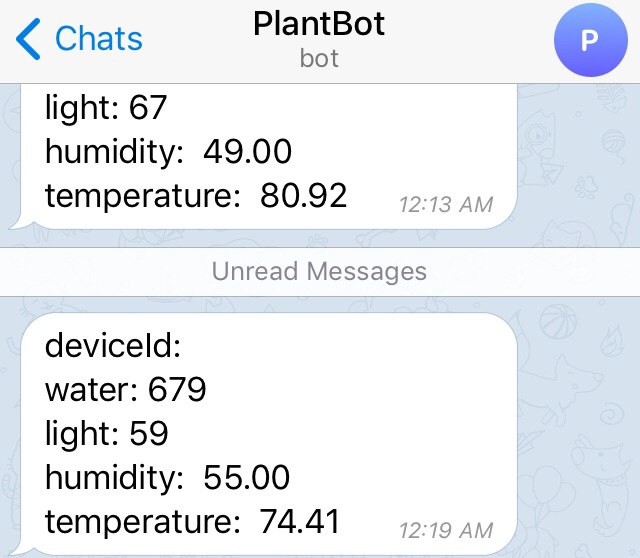
I set up a ESP32 houseplant soil water + temperature + humidity + light sensor that sends me a daily status update message.
Here’s the code for it:


I set up a ESP32 houseplant soil water + temperature + humidity + light sensor that sends me a daily status update message.
Here’s the code for it:


I wanted to make a domain name (heckingoodboys.com) redirect to a multisubreddit for dog pictures, but I didn’t want to run a web server for it.
Here’s what I did:
Enable “Static website hosting” on heckingoodboys.com, select “use this bucket to host this website”, and use routing rules similar to this:
<RoutingRules>
<RoutingRule>
<Redirect>
<Protocol>https</Protocol>
<HostName>www.reddit.com</HostName>
<HttpRedirectCode>302</HttpRedirectCode>
<ReplaceKeyPrefixWith>user/heckingoodboys/m/heckingoodboys/</ReplaceKeyPrefixWith>
</Redirect>
</RoutingRule>
</RoutingRules>
For more details: https://medium.com/@P_Lessing/single-page-apps-on-aws-part-1-hosting-a-website-on-s3-3c9871f126
Why not just use a CNAME from www.heckingoodboys.com to heckingoodboys.com? AWS says they don’t charge for aliases, but they do charge for CNAMEs. So, I used an alias to a bucket instead.
I got a pull request merged into django-celery-email that cuts peak memory usage by about 74% when sending large batches of emails with attachments.
CeleryEmailBackend.send_messages used to serialize every message up front, then split the serialized list into chunks, then hand each chunk to a Celery task:
def send_messages(self, email_messages):
result_tasks = []
messages = [email_to_dict(msg) for msg in email_messages]
for chunk in chunked(messages, settings.CELERY_EMAIL_CHUNK_SIZE):
result_tasks.append(send_emails.delay(chunk, self.init_kwargs))
email_to_dict copies the whole message into a dict, attachments included. Doing that for the entire batch before chunking means every serialized email sits in memory at once. With attachments, that gets expensive fast.
The fix is to chunk the messages first, then serialize one chunk at a time:
def send_messages(self, email_messages):
result_tasks = []
for chunk in chunked(email_messages, settings.CELERY_EMAIL_CHUNK_SIZE):
chunk_messages = [email_to_dict(msg) for msg in chunk]
result_tasks.append(send_emails.delay(chunk_messages, self.init_kwargs))
Same tasks get queued, but only one chunk’s worth of serialized emails exists at a time, so the earlier chunks can be garbage collected once their task is queued.
Benchmarks on 80 emails with a 5 MB attachment each:

I added Twilio backward compatibility to django-sendsms so its Twilio backend would work with both the old (v5) and new (v6+) Twilio clients. The version detection looked like this:
import twilio
if twilio.__version__ > 5:
from twilio.rest import Client as TwilioRestClient
else:
from twilio.rest import TwilioRestClient
That works on Python 2, but it’s broken on Python 3. twilio.__version__ is a string like "6.5.0", and comparing a string to an int raises a TypeError on Python 3:
>>> "6.5.0" > 5
TypeError: '>' not supported between instances of 'str' and 'int'
Python 2 lets you order any two objects (ints always sort before strings), so the same comparison silently returns True there. The bug stayed hidden until the code ran under Python 3.
The fix pulls the major version out of __version_info__ and compares ints to ints:
if int(twilio.__version_info__[0]) > 5:
That same PR added Python 3.5 and 3.6 to the Travis build, so this kind of thing gets caught next time.
According to this blog post, almost never: https://lincolnloop.com/blog/django-anti-patterns-signals/
I just learned about the custom storage systems in Django.
What can you do with custom storage systems?:
“Django abstracts file storage using storage backends, from simple filesystem storage to things like S3. This can be used for processing file uploads, storing static assets, and more.” -https://tartarus.org/james/diary/2013/07/18/fun-with-django-storage-backends
The microservices at my work implement both HTTP endpoints and Apache Thrift RPC endpoints, with Thrift carrying the internal communication between services. External access goes through an API gateway that needs HTTP anyway. I keep losing hours to a Thrift problem I could have solved in minutes over HTTP.
New services don’t get Thrift support at all anymore. They’re documented with Swagger and validated with JSON schema instead, and the tests check requests and responses against the spec.
What makes it harder to live with than HTTP:
TApplicationException: Internal error and nothing else. The generated processor catches it, logs the traceback on the server, and sends back that one opaque message, so every debugging session starts with going to find the server log.Thrift does buy real things. It’s strongly typed, the definitions give you one place to look at all of your models, it validates them for you, and the leaner transport puts less over the wire.
That last one matters less than it sounds. Gzipped JSON is already pretty compact and the default Thrift transports don’t compress at all, so you’re saving a few bytes in exchange for everything above.
If you’re only using Python, marshmallow covers the validation, or you can pair JSON schema with something like warlock to build objects from it. If you do stay on Thrift, thriftpy is a big quality of life improvement over the built-in client because it reads the definitions directly instead of making you generate code from them.
Whether the complexity is worth the performance depends on your scale. Uber runs Thrift across a thousand services and Matt Ranney still summed it up as “Thrift is OK, but generated code is bad” in What I Wish I Had Known Before Scaling Uber to 1000 Services, which is the same complaint that makes thriftpy worth using. For a small team it’s a lot of work and learning to end up somewhere HTTP already is.
A few things I’ve learned while building against JSON-API:
relationships all go into one shared included array rather than being nested under the relationship that points at them. Without a JSON-API client library that’s a slight pain to parse, because you’re matching type and id pairs back to entries in a flat list. It beats duplicating the same object under every relationship that refers to it, but I would have preferred each object type under its own top level key.type, id, attributes, and relationships wrappers around what would otherwise be a flat object.Here are a few things I’ve learned while working on a project that uses Sphinx search:
infix_fields and prefix_fields setting.charset_table if you want them to be searchable.rt_mem_limit from its default of 128mb. If this limit is too low, you’ll see a high number of “disk chunks” when you run the “SHOW INDEX rtindex STATUS” query. More info: http://sphinxsearch.com/blog/2014/02/12/rt_performance_basics/I probably won’t be using Sphinx search for any new projects. Elasticsearch seems preferable these days.
I had a unique constraint on a VARCHAR column and I inserted two rows with the following values:
To my surprise, I got a duplicate error on that 2nd insert. It turns out that MySQL ignores that trailing whitespace when it makes comparisons.
The MySQL docs say this: “All MySQL collations are of type PAD SPACE. This means that all CHAR, VARCHAR, and TEXT values are compared without regard to any trailing spaces. ‘Comparison’ in this context does not include the LIKE pattern-matching operator, for which trailing spaces are significant.” (https://dev.mysql.com/doc/refman/5.7/en/char.html)
The solution? You should probably be trimming trailing whitespace in your API endpoints and on your front-end.