PHP Date Variables
https://www.php.net/manual/en/datetime.format.php
That’s a helpful reference for controlling the output of PHP’s date().
https://www.php.net/manual/en/datetime.format.php
That’s a helpful reference for controlling the output of PHP’s date().
What is the basic difference between echo vs print? (Stack Overflow)
“echo can print more than 1 argument, print can only print 1 argument.”
Since PHP uses $ to declare variables (and not int, etc), one can run into issues with an if statement being unintentionally true.
For example, 0 == null.
The triple equals sign (===) allows you to prevent these cases by only returning true if the two inputs are not the same type.
So, 0 === null is not true. Also, 0 === “0” is not true either.
If you want to install the PDO drivers for PHP 5.4, you will need to extract SQLSRV30.EXE with Winrar.
Since I was using EasyPHP, I needed to extract the files into the following directory (there’s also another php directory in EasyPHP, not sure why, but it’s worth adding the files under “ext” there too): C:\Program Files\EasyPHP-12.1\php\php546x120827090829\ext
You will also need to add the following lines to your PHP.ini file under PHPExt:
extension=php_pdo_sqlsrv_54_ts.dll
extension=php_sqlsrv_54_ts.dll
When you google “SQL Management Studio”, one of the first things that comes up is this (the 2005 version): http://www.microsoft.com/en-us/download/details.aspx?id=8961
I recommend not installing 2005 if you have SQL Server 2008 Express installed! You will not be able to manage your 2008 server, and you will need to uninstall management studio to install the 2008 version here: SQL Server Management Studio
http://www.rondebruin.nl/find.htm
The above website has some great snippets of code which can:
This is some very useful code from Stack Overflow which allows the user to select a folder in VBA and reads the folder path into a variable. I’m currently making a macro which opens several XML files in a folder, and this will help users to input the folder where those XML files are located:
Sub SelectFolder()
    Dim diaFolder As FileDialog

    ' Open the file dialog
    Set diaFolder = Application.FileDialog(msoFileDialogFolderPicker)
    diaFolder.AllowMultiSelect = False
    diaFolder.Show

    MsgBox diaFolder.SelectedItems(1)

    Set diaFolder = Nothing
End Sub
Application.DisplayAlerts = False
On Error Resume Next
ThisWorkbook.Sheets("Sheet1").Delete
On Error Goto 0
Application.DisplayAlerts = True
C:\Users\YourName>java -jar app.jar
Error occurred during initialization of VM
java/lang/NoClassDefFoundError: java/lang/Object
If you get this error when you just type “java” into the command prompt, then it can be solved by typing “PATH=C:\Program Files\Java\jdk1.7.0_06\bin” (the folder of your java.exe).
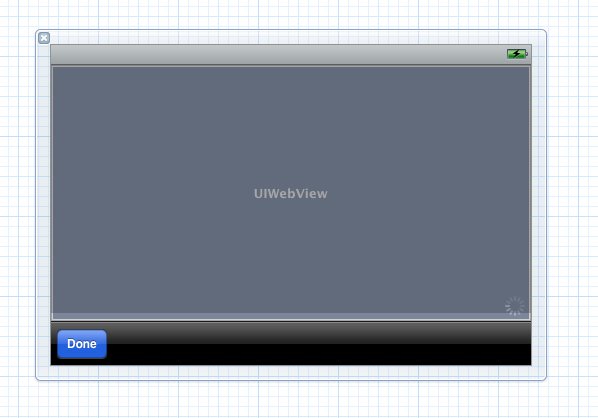
In IOS, removing the back/forward, refresh, and history buttons from ChildBrowser requires opening its .xib file.
I removed everything except the done button: