I got most of this function from this CakePHP Bakery article. It will find all the uidNumbers, sorting them largest to smallest, then return the largest number.
$ds=ldap_connect("localhost");// assuming the LDAP server is on this hostfunctionfindLargestUidNumber($ds){$s=ldap_search($ds,"ou=people,dc=yourdomain,dc=com",'uidnumber=*');if($s){// there must be a better way to get the largest uidnumber, but I can't find a way to reverse sort.ldap_sort($ds,$s,"uidnumber");$result=ldap_get_entries($ds,$s);$count=$result['count'];$biguid=$result[$count-1]['uidnumber'][0];return$biguid;}returnnull;}$largestUID=findLargestUidNumber($ds);
Apparently a script does not equal a macro in outlook. When you’re setting up a rule, you have the option to run a script. However, your macro will not show up in the script menu unless it has (MyMail As MailItem) as an argument. Example:
Sub Save(MyMail As MailItem)

SaveEmailAttachmentsToFolder "AgentReports", "html", "C:\Users\you\Documents\Agent Reports\Saved"

End Sub
Sub Test()
'Arg 1 = Folder name in your Inbox
'Arg 2 = File extension, "" is every file
'Arg 3 = Save folder, "C:\Users\Ron\test" or ""
'If you use "" it will create a date/time stamped
'folder for you in the "My Documents" folder.
'Note: If you use this "C:\Users\Ron\test" the folder must exist

    SaveEmailAttachmentsToFolder "Reports", "html", "C:\Users\YourName\Documents\Saved"

End Sub

Sub SaveEmailAttachmentsToFolder(OutlookFolderInInbox As String, _
                                 ExtString As String, DestFolder As String)
    Dim ns As NameSpace
    Dim Inbox As MAPIFolder
    Dim SubFolder As MAPIFolder
    Dim Item As Object
    Dim Atmt As Attachment
    Dim FileName As String
    Dim MyDocPath As String
    Dim I As Integer
    Dim wsh As Object
    Dim fs As Object

    On Error GoTo ThisMacro_err

    Set ns = GetNamespace("MAPI")
    Set Inbox = ns.GetDefaultFolder(olFolderInbox)
    Set SubFolder = Inbox.Folders(OutlookFolderInInbox)

    I = 0
    ' Check subfolder for messages and exit of none found
    If SubFolder.Items.Count = 0 Then
        MsgBox "There are no messages in this folder : " & OutlookFolderInInbox, _
               vbInformation, "Nothing Found"
        Set SubFolder = Nothing
        Set Inbox = Nothing
        Set ns = Nothing
        Exit Sub
    End If

    'Create DestFolder if DestFolder = ""
    If DestFolder = "" Then
        Set wsh = CreateObject("WScript.Shell")
        Set fs = CreateObject("Scripting.FileSystemObject")
        MyDocPath = wsh.SpecialFolders.Item("mydocuments")
        DestFolder = MyDocPath & "\" & Format(Now, "dd-mmm-yyyy hh-mm-ss")
        If Not fs.FolderExists(DestFolder) Then
            fs.CreateFolder DestFolder
        End If
    End If

    If Right(DestFolder, 1) <> "\" Then
        DestFolder = DestFolder & "\"
    End If

    ' Check each message for attachments and extensions
    For Each Item In SubFolder.Items
        For Each Atmt In Item.Attachments
            If LCase(Right(Atmt.FileName, Len(ExtString))) = LCase(ExtString) Then
                FileName = DestFolder & Item.SenderName & " " & Atmt.FileName
                Atmt.SaveAsFile FileName
                I = I + 1
            End If
        Next Atmt
    Next Item

    ' Show this message when Finished
    If I > 0 Then
        MsgBox "You can find the files here : " _
             & DestFolder, vbInformation, "Finished!"
    Else
        MsgBox "No attached files in your mail.", vbInformation, "Finished!"
    End If

    ' Clear memory
ThisMacro_exit:
    Set SubFolder = Nothing
    Set Inbox = Nothing
    Set ns = Nothing
    Set fs = Nothing
    Set wsh = Nothing
    Exit Sub

    ' Error information
ThisMacro_err:
    MsgBox "An unexpected error has occurred." _
         & vbCrLf & "Please note and report the following information." _
         & vbCrLf & "Macro Name: SaveEmailAttachmentsToFolder" _
         & vbCrLf & "Error Number: " & Err.Number _
         & vbCrLf & "Error Description: " & Err.Description _
         , vbCritical, "Error!"
    Resume ThisMacro_exit

End Sub
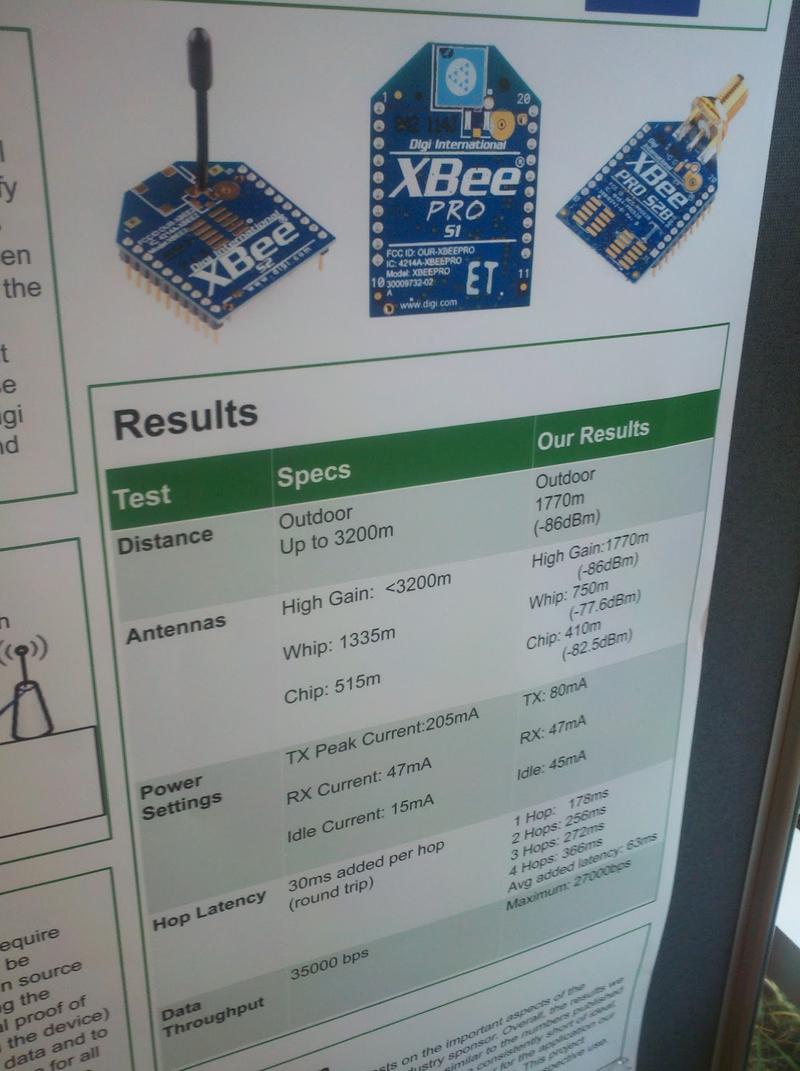
The picture above shows some research done by some UTD students for their UT Design program.
Their results showed the specs claimed by Xbee modules were far superior to reality. They said they experienced an overwhelming amount of noise at about half of the rated distance and both the peak and idle current ratings were inaccurate.