MegaCli64 / MegaCli Only showing "Exit Code: 0x00"
Problem: You see MegaCli64 or MegaCli only showing “Exit Code: 0x00” when you try to run commands.
Solution: Try running as sudo.
Problem: You see MegaCli64 or MegaCli only showing “Exit Code: 0x00” when you try to run commands.
Solution: Try running as sudo.
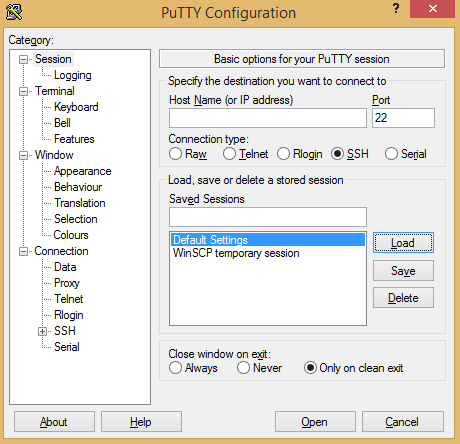
If you need to change Putty’s defaults, press “Load” on the saved session for “Default Settings”, make your changes, and “Save”.
This is my favorite boilerplate for new projects so far: https://github.com/kirpit/django-sample-app
Because:
If you’re not a fan of bootstrap, django-html5-boilerplate also looks good.
http://stackoverflow.com/a/27424739/1364191
It’s definitely a common mistake for people using WTForms. When you create a form and use something like datetime.date.today() as a default value, that value will always stay the same. The fix is to use “datetime.date.today” instead of datetime.date.today().
In your flask application, you need to:
port=5000 (this seems to be Dokku’s default too)host=0.0.0.0 (this allows your host server to connect to the container)In your Procfile:
web: python <your-app>.py
If you’re using gunicorn, it shouldn’t matter because it’s not using app.run().
If you still can’t connect to your application after it deploys, see this: http://www.paulsprogrammingnotes.com/2014/12/troubleshooting-dokku-not-accessible.html
First, make sure your application isn’t giving any errors when it attempts to run:
dokku run <your-app> "<whatever is in your proc file>"
Get the :port number from the line with “upstream” in the following file: /home/dokku/<your-app>/nginx.conf
Try to wget 127.0.0.1:<your-port> from the host. Will it connect?
While using Dokku, I was getting the following error message: Requested runtime (python-2.7.8) is not available for this stack (cedar-14).
This was due to a connection error between my docker container and the internet. To determine this, I ran “docker images” and got the image id of “programium/buildstep”, then got into a container with the following command: sudo docker run -t -i <your image id> /bin/bash
Once in the container, I ran:
curl http://lang-python.s3.amazonaws.com/cedar/runtimes/python-2.7.8.tar.gz -s
If that is unsuccessful, that should confirm it’s a connection issue.
This was the solution to the problem: http://www.paulsprogrammingnotes.com/2014/12/rebuilding-buildstep-image-for-dokku.html
I had to change the buildstep image’s docker file to add my proxy. This is because the buildstep image required a proxy before the build to download the python buildpack.
I was rebuilding the buildstep image for dokku with these instructions: https://github.com/progrium/dokku/commit/9ebf453b72cab3a16ea261284236bb7c20ca3a1a#diff-04c6e90faac2675aa89e2176d2eec7d8R101
I’m behind a proxy, so I was getting this error when I ran “sudo make build”:
Cloning into ‘heroku-buildpack-multi’… fatal: unable to access ‘https://github.com/ddollar/heroku-buildpack-multi.git/’: Failed to connect to github.com port 443: Connection timed out
The solution? Replace the Dockerfile in the root of the folder you git cloned with this:
Updated 2026-09-08: Dokku switched from buildstep to herokuish in v0.3.26 (August 2014), essentially concurrent with this post. Current Dokku uses herokuish/CNB buildpacks and the docker-options plugin for the kind of proxy-related customization this post was solving, rather than rebuilding a buildstep image directly.
Timeout: (<pip._vendor.requests.packages.urllib3.connection.VerifiedHTTPSConnection object at 0x27330d0>, 'Connection to pypi.python.org timed out. (connect timeout=15)')
If you’re installing several requirements from a requirements.txt file, it helps to use -v after your pip install command to figure out which module has the timeout. Most likely, it’s trying to download a module from a URL that doesn’t exist.
Flask-Admin’s filters handled equals, greater-than, contains, and the like, but not “is this one of these values” or “is this empty”. I added both.
The “in list” and “not in list” filters use Select2’s tag input, so you type several values and it filters with OR. The “empty” filter matches NULL or not-NULL. That was #711 on the SQLAlchemy backend. The same change let filters that already have predefined options skip setting the select2 data type explicitly, and pulled in select2-bootstrap-css so the dropdowns stopped looking broken on Bootstrap 3.
Then I added the empty, between, and list filters (with tests) to the mongoengine and peewee backends (#717), so all three ORMs behave the same. A couple of small fixes followed for non-integer filter values (#718) and “in list” integer validation (#719).